The Uurly desktop app
For Mac, Windows and Linux. The app has four tabs, and this page follows them: Overview, Discover, Trade and Automation. Then what keeps running outside the window.
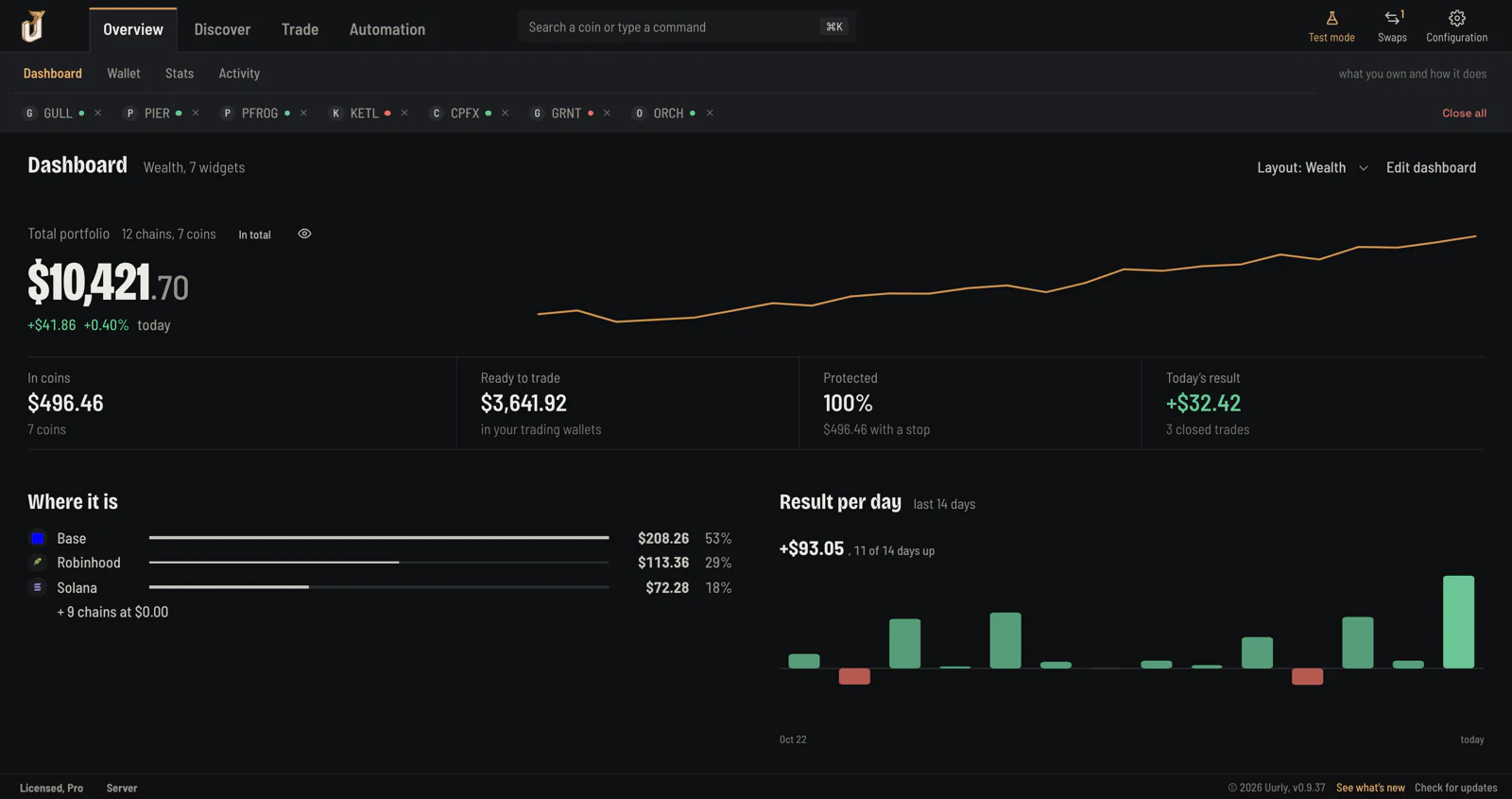
The first tab
Overview
What you own and how it does.
- Dashboard
- Wallet
- Stats
- Activity
The Dashboard
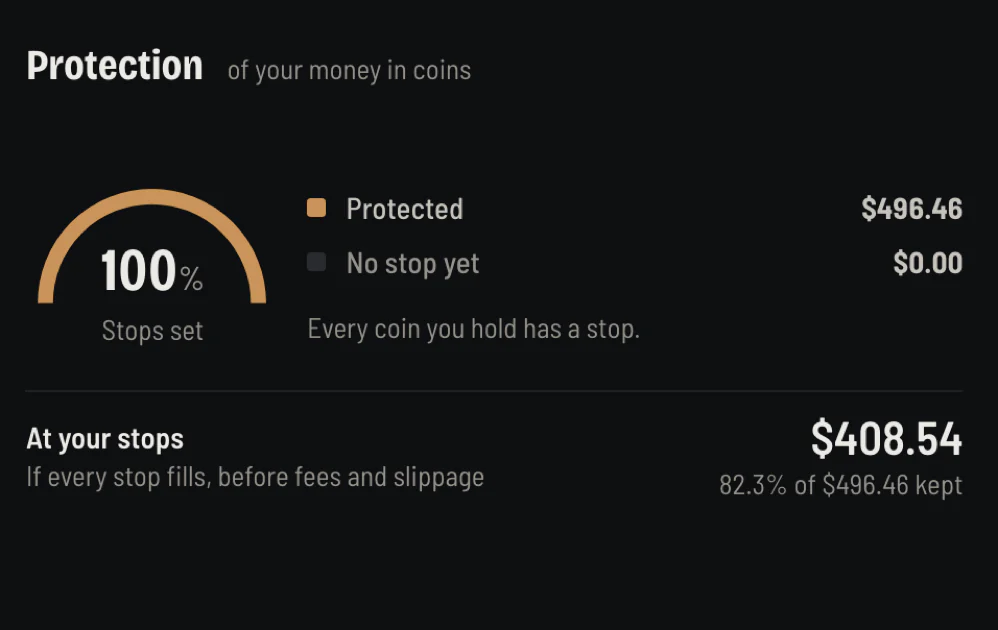
How much of your money in coins has a stop, what you keep if every stop fills, the room to each stop, today's result and, with Signals on, the coins refused today. You choose the widgets and where they sit.
- Protectedthe share of your money in coins that has a stop
- At your stopswhat you keep if every stop fills, before fees and slippage
- Trade reviewan AI review of your trades each day or week, on your own AI key
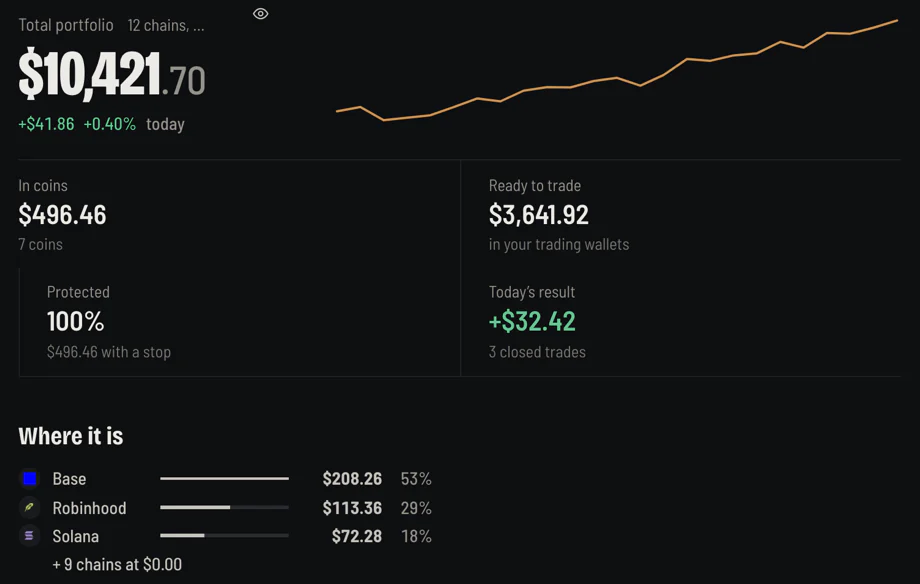
One total of everything you own
The Uurly Wallet on 64 chains, Bitcoin, your exchanges and your hardware wallets, in one number. You choose under In total what counts, and the value line shows market moves only.
- Exchanges, read-onlyUurly refuses a key that can trade or withdraw
- View-only walletsa hardware wallet by its addresses or xpub, no key and no cable
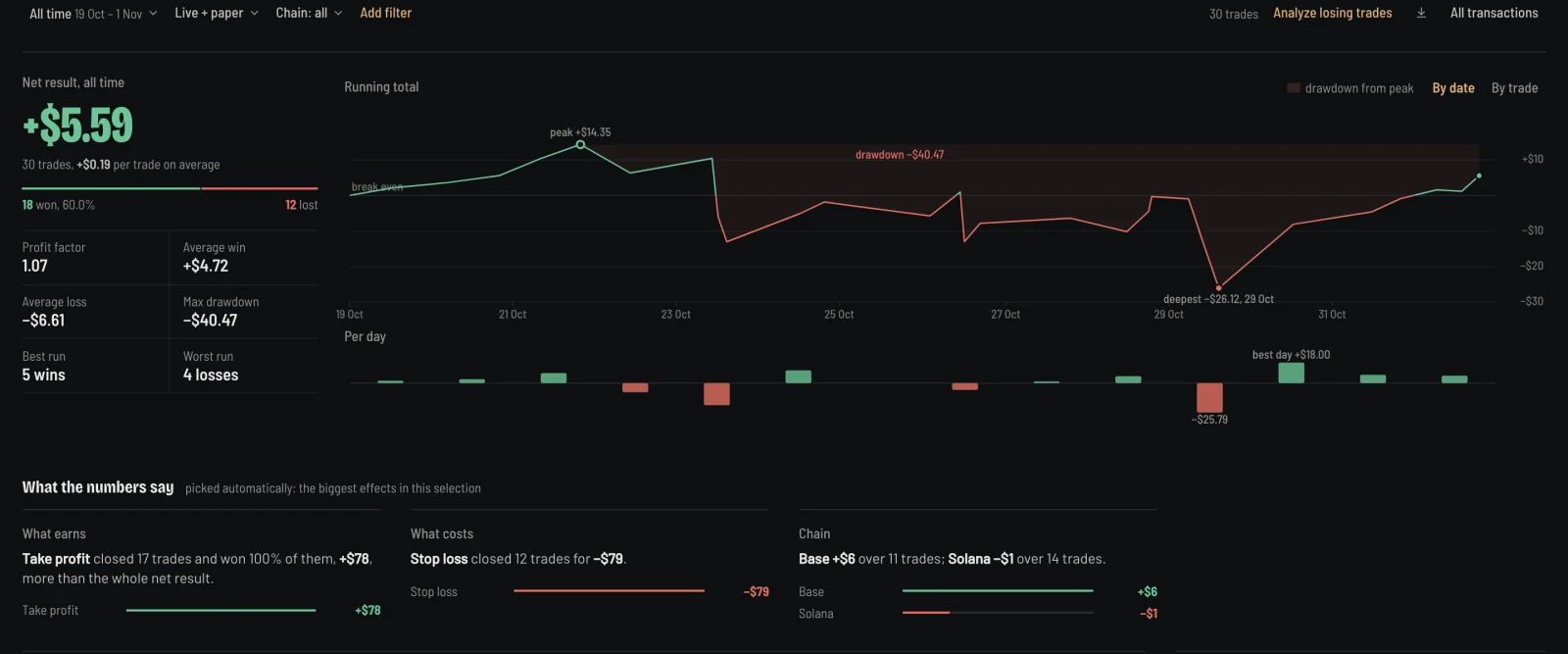
Every buy, sell, swap and send in one record
Activity lists what happened to your money: buys, sells, swaps, sends, money received and price alerts. A buy and its sells show as one trade, with how long you held it and the result, and the period's best and worst trade beside it.
- Statsthe results of your closed trades
- All transactionsone CSV with every buy, sell, swap, send and receive Uurly has on record, with the Uurly fee and, where the network reports it, the network fee
For example: at the end of the year, export All transactions and bring the file to your tax tool or your accountant.
The second tab
Discover
Find coins: the market, the scanner and the wallets you follow.
- Markets
- Trending
- Signals
- Wallet tracker
- Watchlist
- Security check
Find a coin by name or contract, on every chain you trade
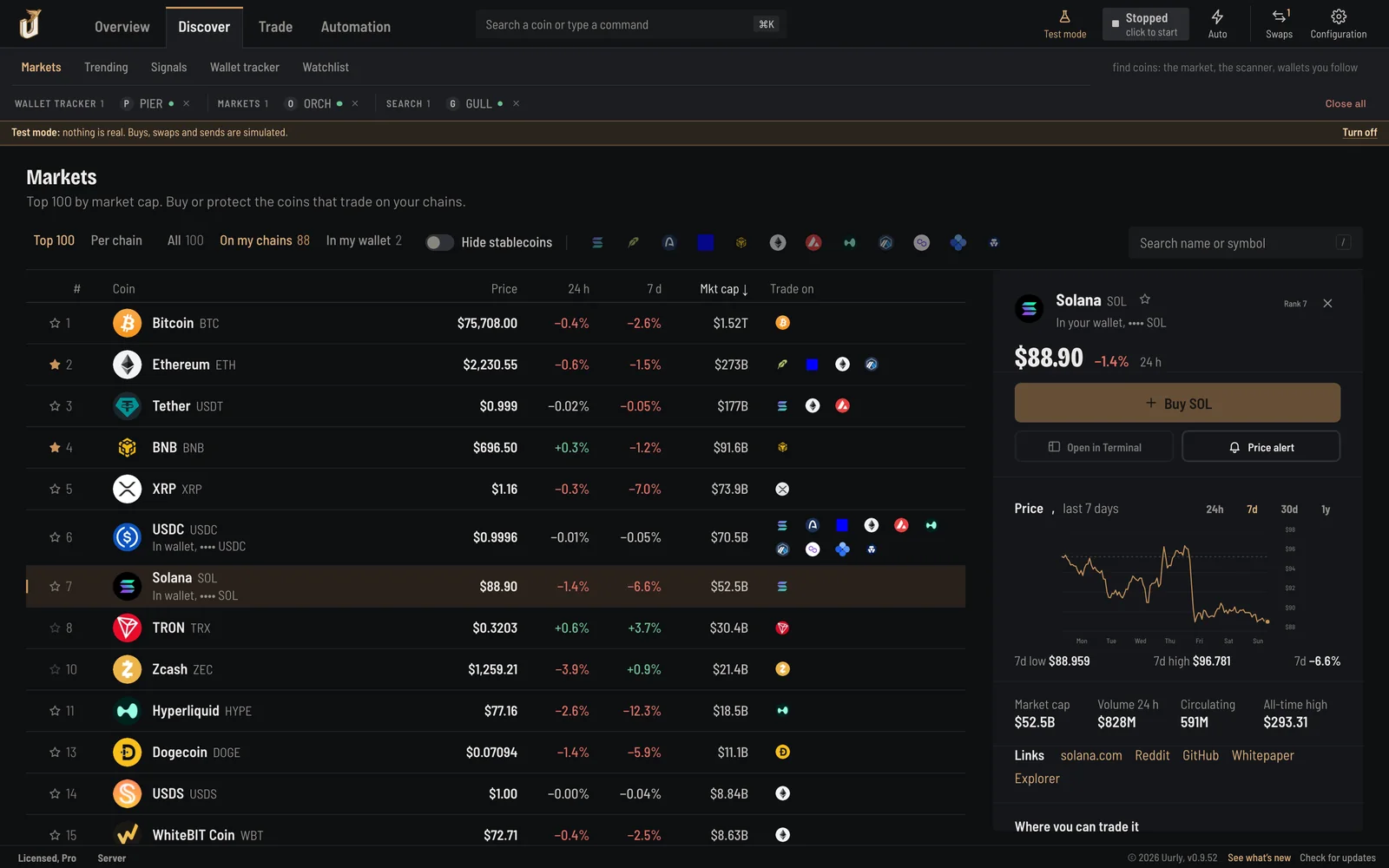
Markets shows the top 100 and, per chain, the top coins by liquidity. Search looks across all your chains by name, ticker or contract address, and any coin with a pool on a chain you trade can be bought and protected.
- Per chainSolana, Base, Ethereum, BNB Chain, Arbitrum, Avalanche and six more chains, with volume and how long each coin has traded
- Warnings in the resultscopycat names, low liquidity and brand-new coins
- Price alerts for every coinunder a price, above a price, or a rise of a set percentage within an hour; an alert never buys
Trending, Signals and the Wallet tracker
Each one shows its reason, so you can see why a coin is on the list. Only Signals can buy on its own, and only after you switch that on.
- Trendingranked by different buyers, trades and volume; paid promotion never moves a coin up
- Signalsone list, newest first; every line names the reason, with the measured value and your limit
- Wallet trackerup to 10 wallets on every chain, read from the chain itself; Buy opens a buy you confirm
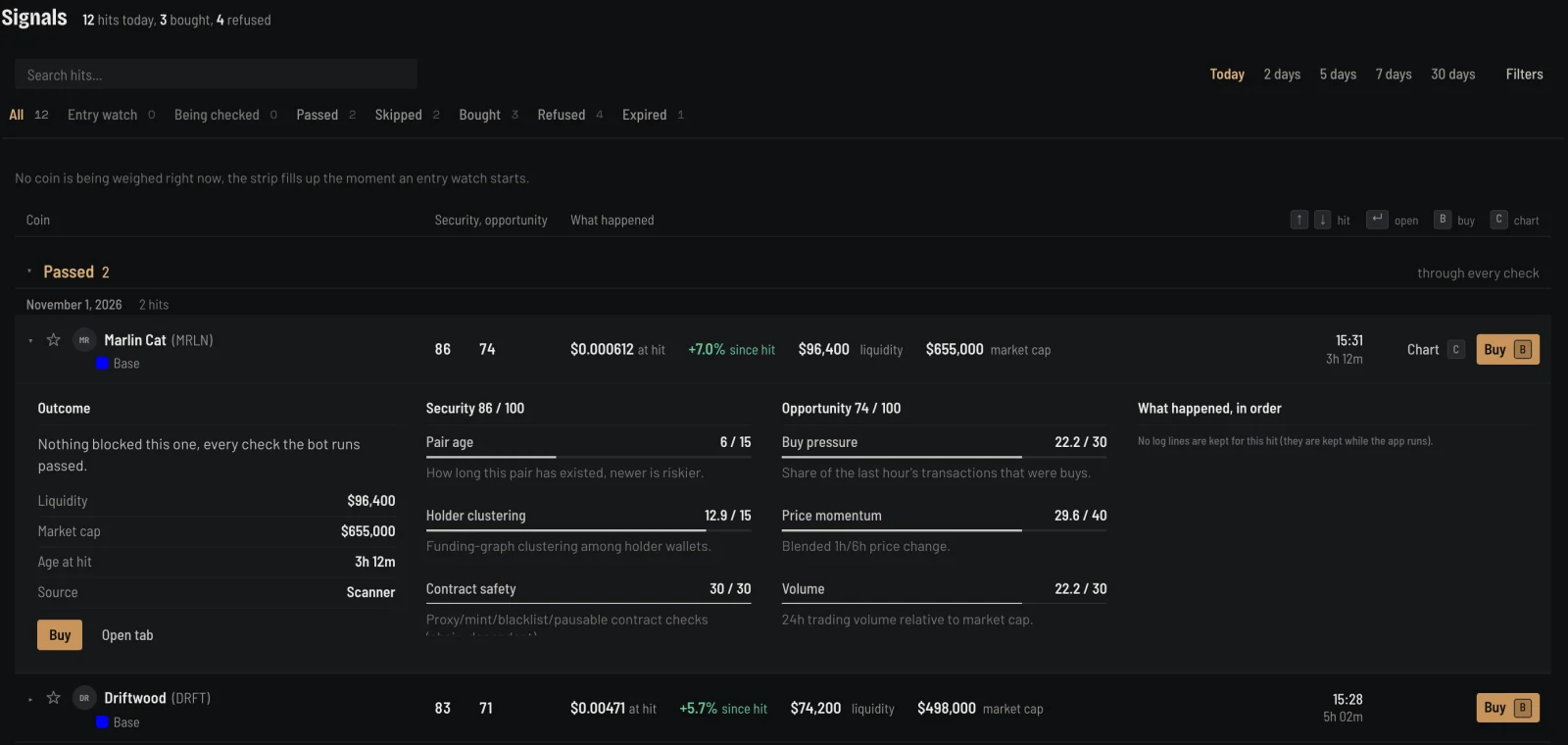
Signals are information you switch on. Uurly doesn't recommend, rank or endorse any coin. Following a wallet can make you its exit liquidity. A passed check is not a safe coin. Not investment advice.
The third tab
Trade
Buy, sell, protect.
- Positions
- Manual buy
- Search
- Terminal
Positions with stops and take-profit
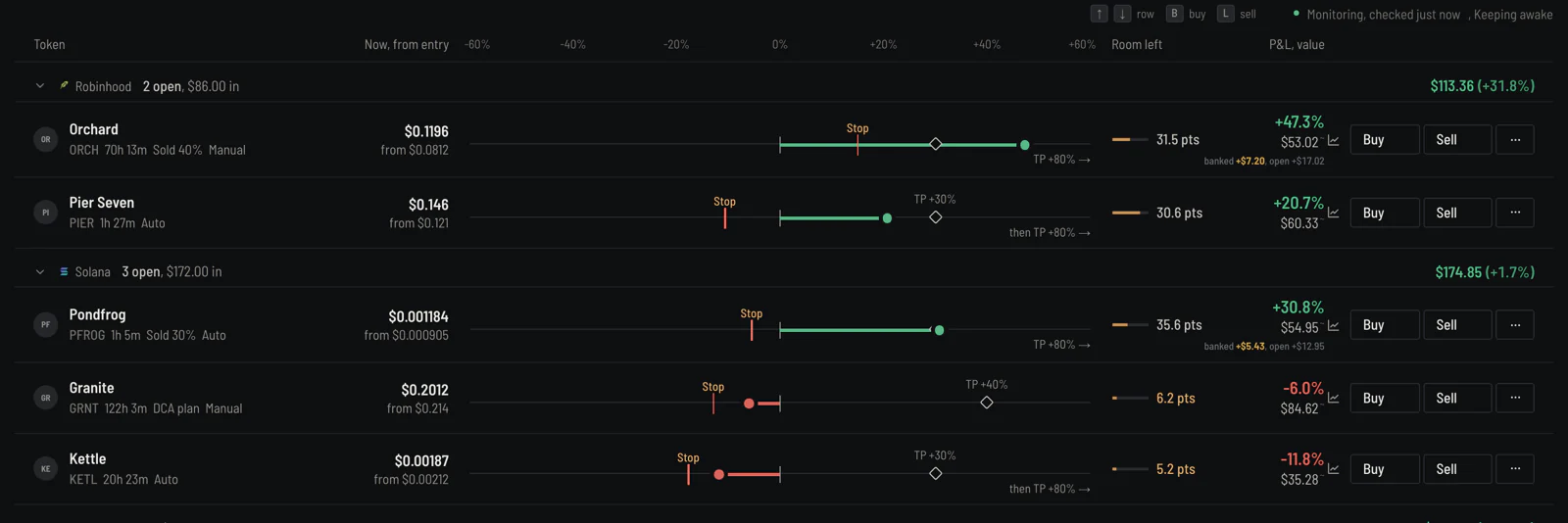
Every buy you make yourself starts with the stop-loss and take-profit you set in Configuration, and the coin is protected the moment the buy lands. Edit changes them for that one buy.
- Stop or trailing stopa fixed price or a distance below the highest price
- Take-profit in stepsfor example 25% of the coin at +20% and 25% at +50%
- Stop floormove it to break-even, +50% or +100%
The Terminal
The chart, the order ticket and the coin's checks side by side, like an exchange terminal. Your positions, Hits and Trending sit in the left column.
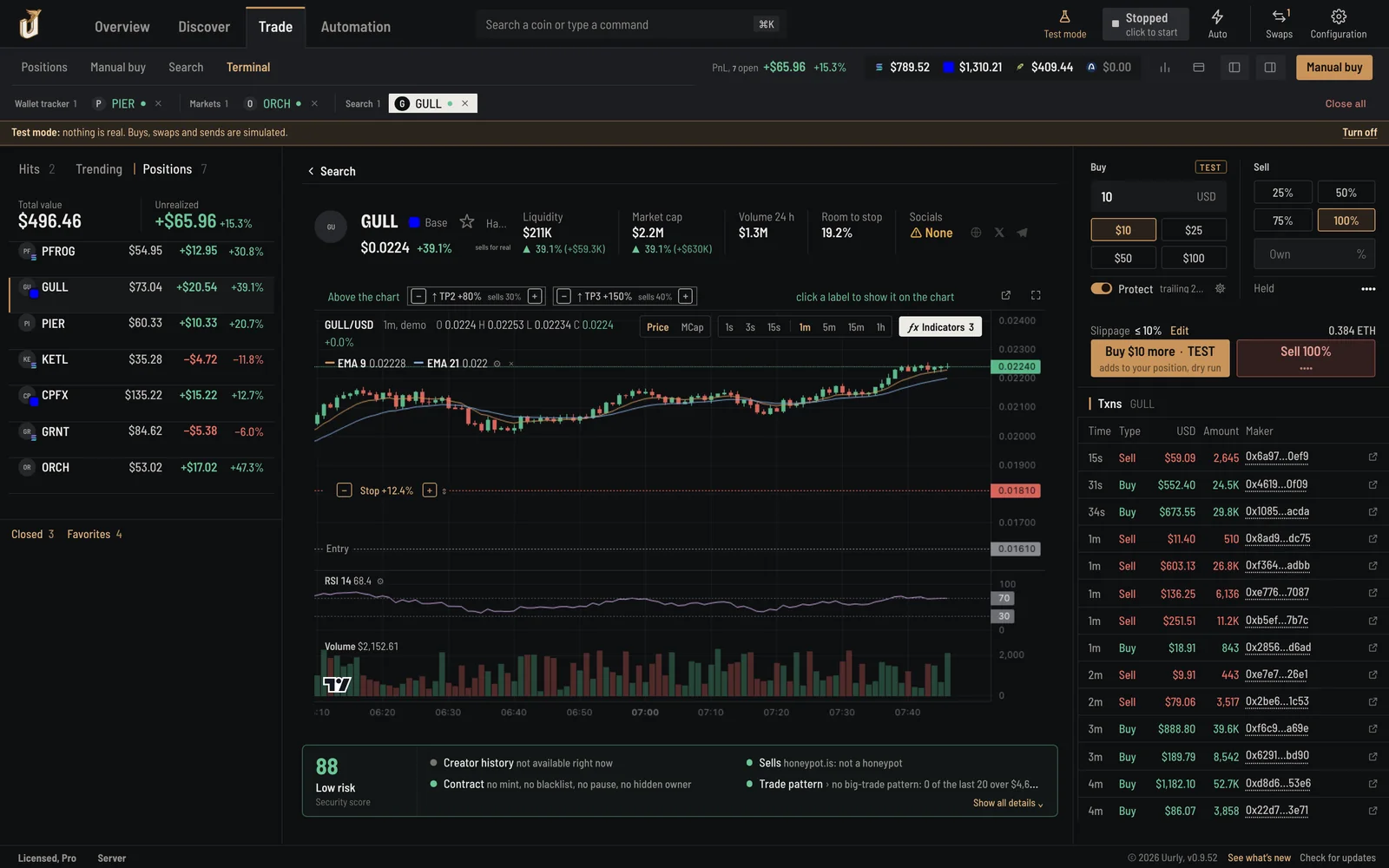
- An order ticket like an exchangeBuy, Sell and Auto, the amount with your balance, slippage, the protection on one line and one big button.
- Stops you drag on the chartThe stop-loss and take-profit lines have − and + buttons. A drag or a click saves at once, with Undo.
- Candles by the secondOne-, three- and fifteen-second candles, built from the coin's own swaps.
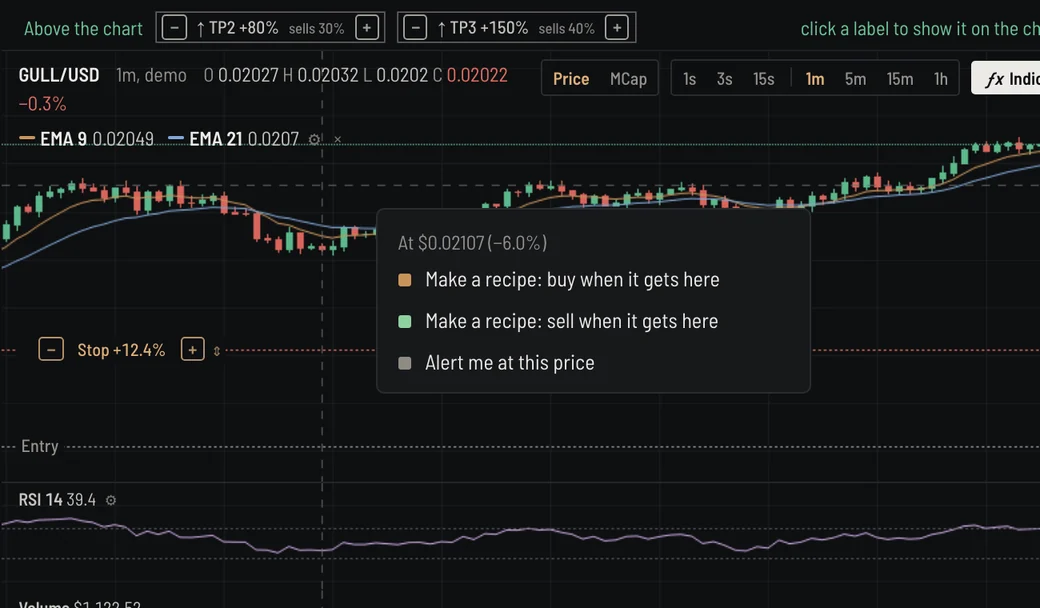
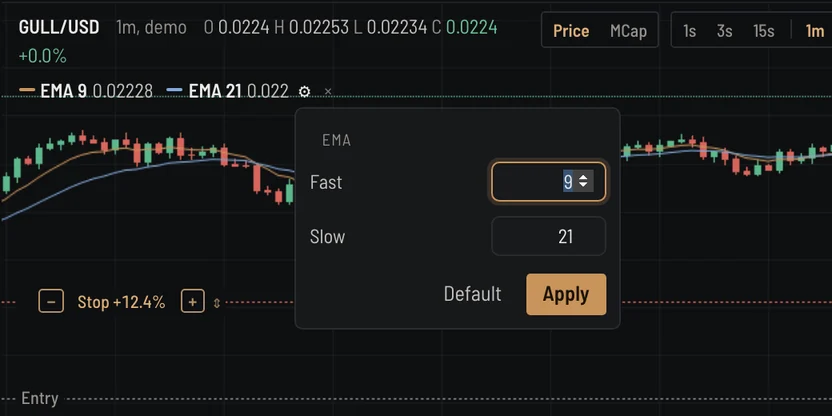
- Indicators on the chartEMA, SMA, Bollinger Bands, VWAP, RSI, MACD and Volume. The ⚙ next to each one sets its lengths, for example EMA 5 and 13 instead of 9 and 21.
- Right-click a priceMake a recipe that buys or sells when the coin gets to that price, or set a price alert there.
- Coins you opened yourselfEvery Chart button in the app opens the coin here. The row above the chart keeps those coins, grouped by where you found them; signals stay in the Hits list.
- The risk block under the chartThe security score, who holds the liquidity, the sell test with its tax, the launch buyers and the contract, each with its reason. Show all details opens every reason.
- When the liquidity is pulledA banner under the coin's name says who took it, how much and when, and Buy is switched off.
- Live tradesEvery swap in the pool as it lands, with the wallet that made it, and liquidity added or removed between the trades.
Type the order, confirm the preview
The command bar takes buys, swaps, stops and DCA plans in short words, and shows a preview before anything happens. With your own AI key and plain language switched on, it also takes orders in ordinary words.
⌘K
buy 50 usd coin protect stop 8% tp 25%@+20
swap all usdc to coin
move stop coin to break-even
Ctrl+K on Windows and Linux. The first line buys $50 of the coin with a stop 8% below the buy and sells 25% at +20%.
The fourth tab
Automation
What Uurly does for you, and why.
- Status
- Recipes
- DCA plans
- Scanner rules
What ran for you, and why each coin was refused
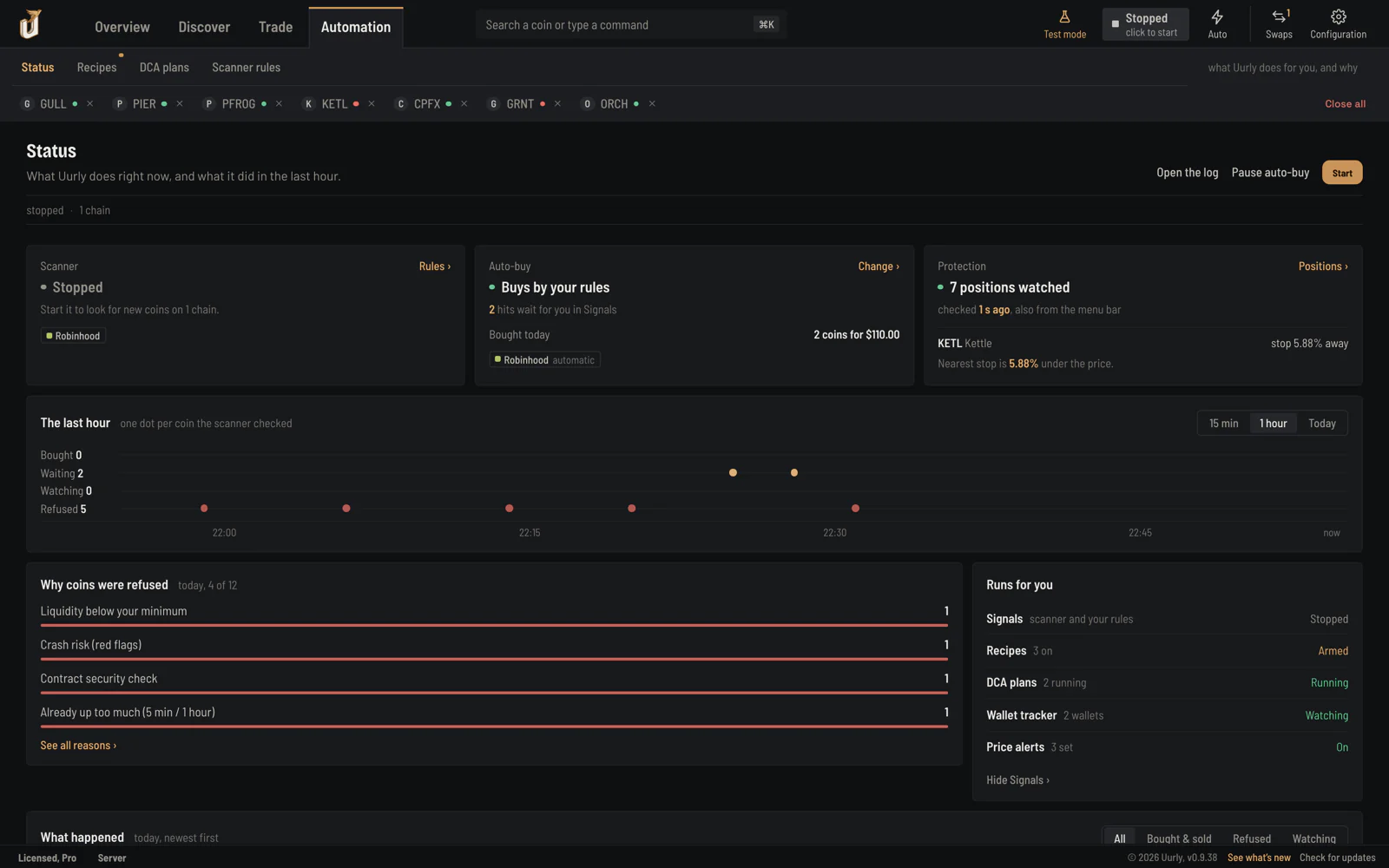
Status shows the scanner, auto-buy and protection, each with its own numbers. The last hour shows one dot per coin the scanner checked, each with its reason, and a feed below shows what happened today.
- Why coins were refusedthe reasons that stopped the most coins today, with how many each one stopped
- Runs for youSignals, Recipes, DCA plans, the Wallet tracker and price alerts, with Pause auto-buy and Stop on the same page
Recipes drawn on the chart, and DCA plans
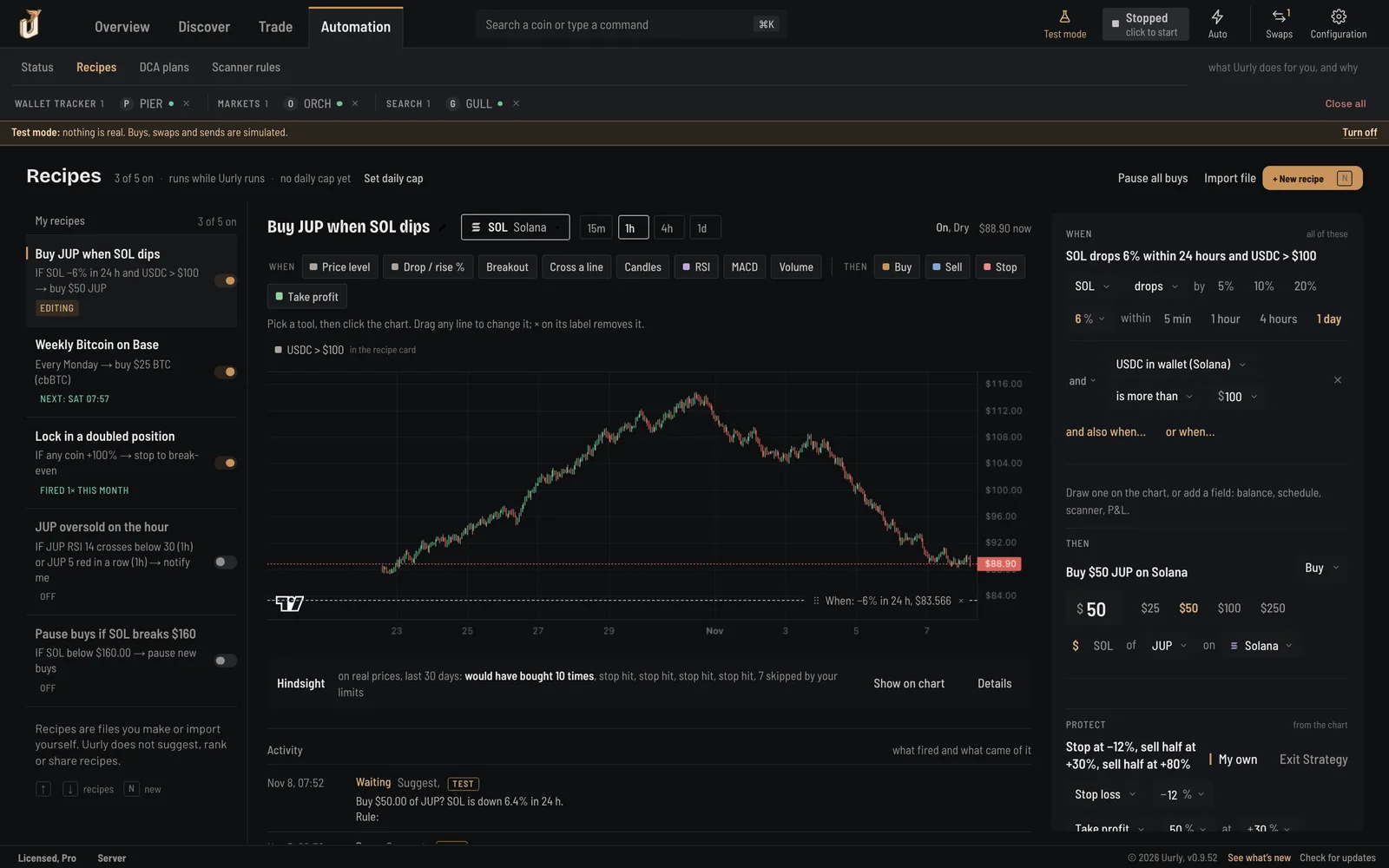
A Recipe is a WHEN / THEN rule you write. You draw it on the coin's chart: pick a tool, click the chart, and the line becomes a condition, a buy, a stop or a take-profit. Drag a line to change it. A DCA plan buys by time or at price steps, protected from the first buy. Each has its own Test or Live switch.
- Toolsprice level, drop or rise %, breakout, cross a line, candles in a row, RSI, MACD and volume; buy, sell, stop and take profit
- Hindsight under the charthow often the rule would have fired on real prices in the last 30 days, with Show on chart and Details; hindsight, not a forecast
- Notify, Suggest or Autoper Recipe, with a limit per day or week and a budget
- Missed buysa DCA buy that was missed is never bought on its own
Limits you set before anything buys on its own
Set these before you switch on Signals, Recipes or DCA plans. The daily loss limit is checked again right before every buy is sent.
| Max daily loss | Pauses new buys until midnight. Open positions keep their own stop and take-profit. |
|---|---|
| Pause new buys | From the app or your phone. Stops keep running. |
| You confirm, or it buys | Per chain, Signals suggests each buy for you to confirm, or buys within your limits. In the EEA a scanner hit is bought only after you confirm, unless a Recipe of yours buys it. |
| Templates | Careful, Balanced and Runner, or your own: how much per buy, the exits and the budget per chain, with at most 5 open per chain. |
Outside the window
Everywhere
Your phone, the menu bar, and what keeps your stops running.
- Phone dashboard
- Menu bar
- Start at login
- Keep awake
Your positions on your phone, with pause and a signed emergency sell
The phone dashboard shows your total, protection, today and every open position. It can pause and it can sell; it never buys.
The Uurly dashboard is not available during the beta.
| Push notices | A buy or a sell, money received, the daily loss limit reached, and the app no longer answering. |
|---|---|
| Pause | Pause the bot or only new buys from your phone. Resuming happens in the app. |
| Emergency sell | 25, 50 or 100% of a position with a stop, confirmed on your paired phone with your two-step code, or Face ID once you add a passkey on that phone, within a daily limit. |
Free, or Pro without the fee
Free Betaavailable now
$0
Every feature. 0.85% Uurly fee per swap.
Pro founding price, first 50
$7.99a month
Every feature, no Uurly fee. Excl. VAT. Coming soon.

The exchange tools, without the exchange
Uurly Free is open as a beta. You create a free account with your email address, then download.