

The exchange tools, without the exchange. Stops, take-profit and DCA plans on coins in your wallet.
Set stops and take-profit, buy in steps or write IF / THEN rules on 36 chains, from Bitcoin to Solana and Base. The app signs each trade on your computer; Uurly's server never sees a key.
A free version of Uurly is coming.
Join the waitlist and we'll email you when it's out. For Mac, Windows and Linux.
- Bitcoin
- Ethereum
- Solana
- Base
- +32 more
- Keys stay on your computer
- Pro: no Uurly fee on any swap
- Rules you set run while the app is open
In three steps
From first buy to the Dashboard
- 01
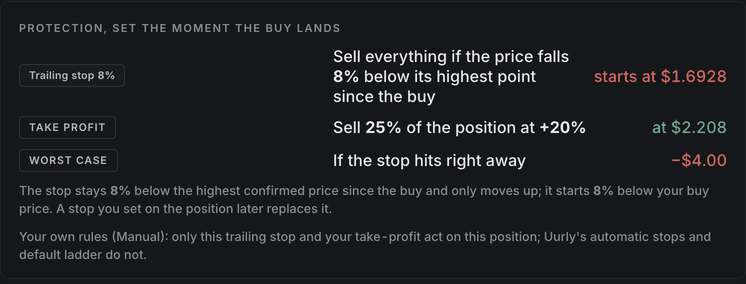
Buy with protection attached
Set a stop-loss or a trailing stop with the buy. The trailing stop moves up with the price and sells if the price falls back by your percentage.
- 02
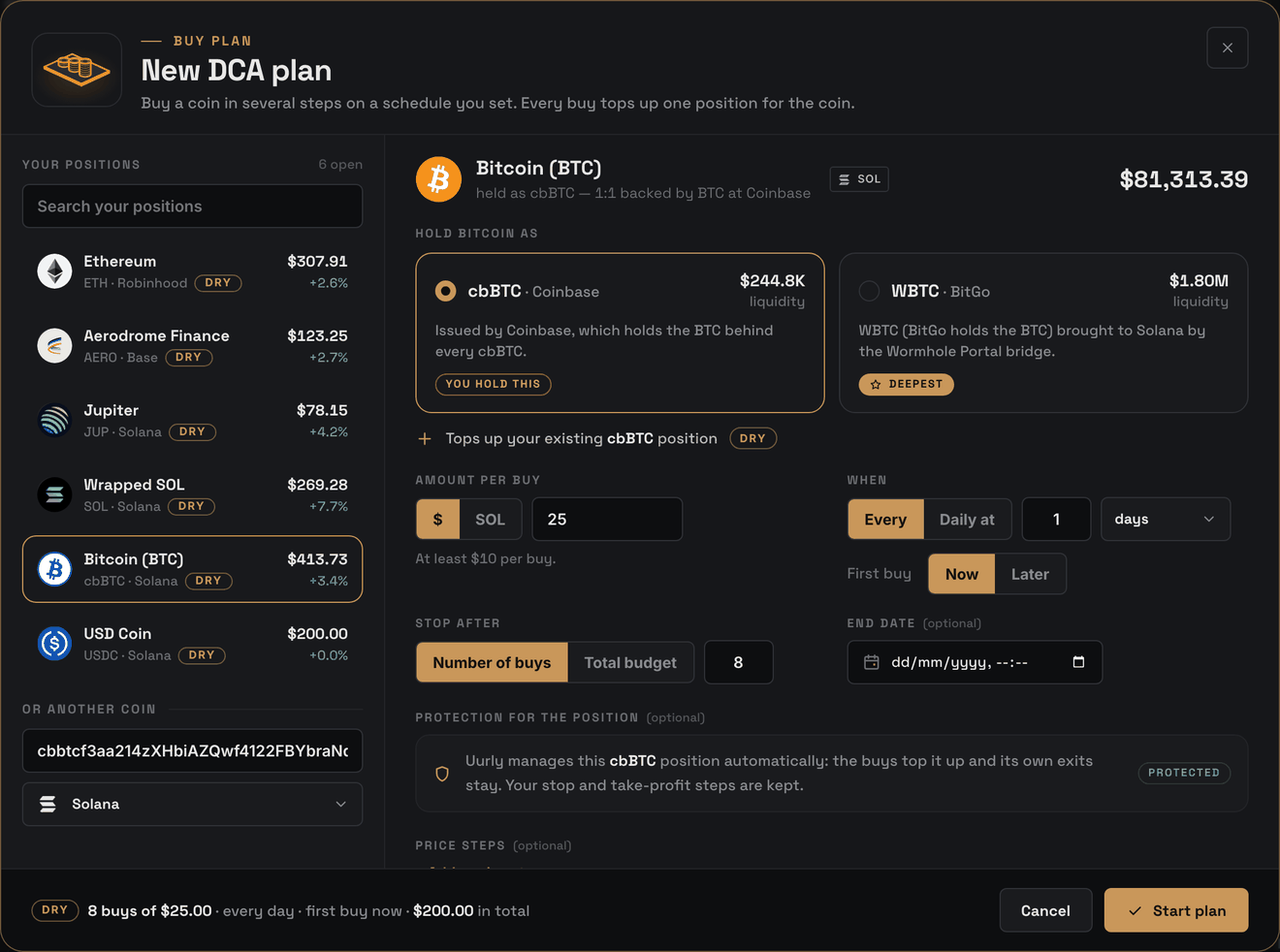
Add a DCA plan
Buy more in steps: a set amount every day, or at price steps you choose. Every buy tops up the same protected position.
- 03
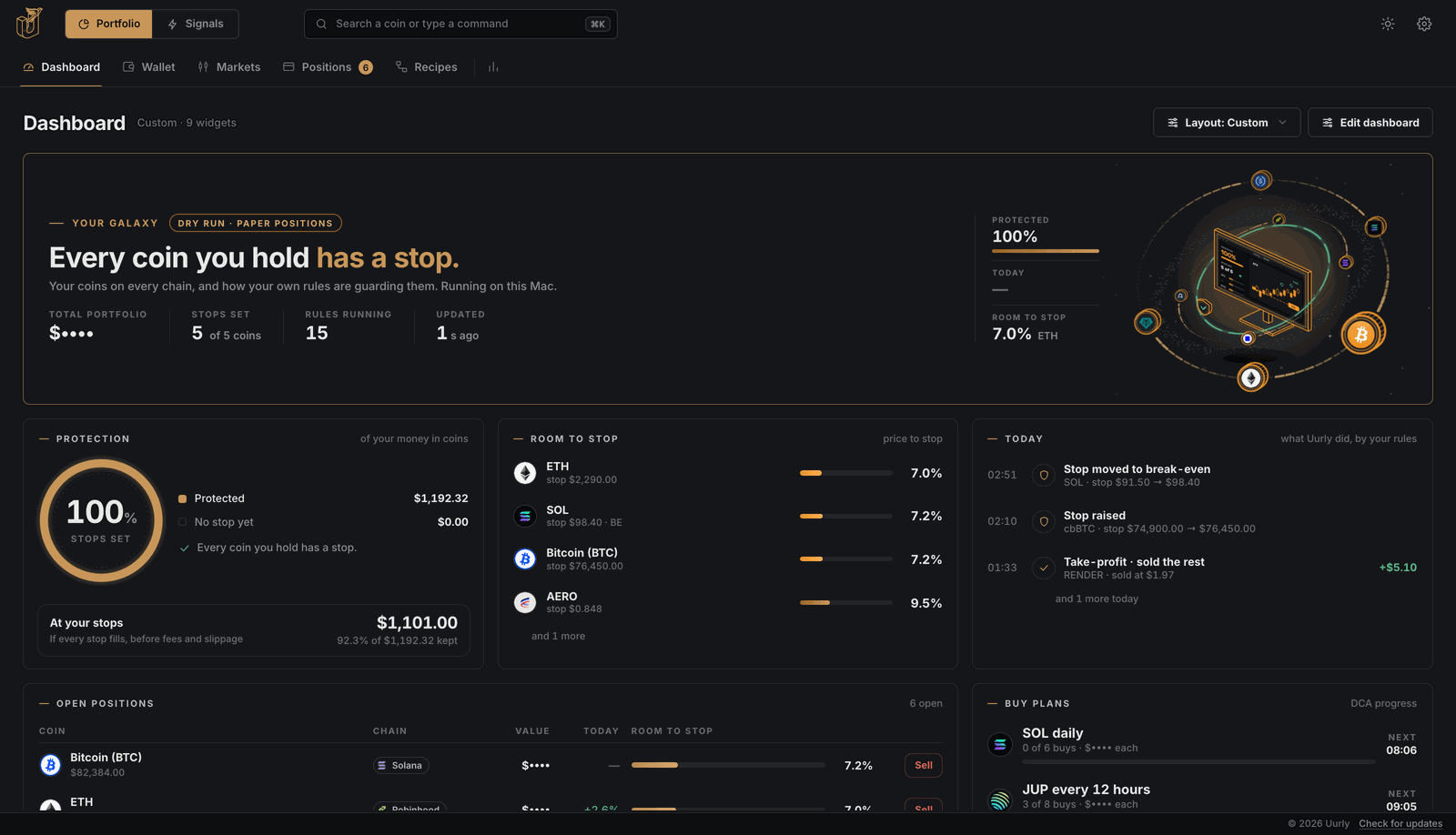
Follow it on the Dashboard
Positions, stops and today’s activity across all chains.


Why Uurly
Non-custodial by design
Uurly is a non-custodial Web3 wallet that runs locally on your computer. Your private keys are created and encrypted on your device, and every transaction is signed there before it goes on-chain. Uurly does not hold your funds and has no access to your wallet.
Your computer
The Uurly app
- Your wallet keys, encrypted with your password
- Signs every trade itself
- Runs your stops, DCA plans and Recipes
The blockchain
36 chains
- Trades go straight to on-chain pools
- Your coins stay in your wallet
- No exchange account in between
Uurly
Your account
- Your account and license
- Never holds a key or a coin
- Can’t trade, move or freeze your coins
Keys never leave your computer
Encrypted on your computer and unlocked only by your app password or Touch ID. Uurly has no copy.
How keys are stored- Every update
Only signed updates
The app installs an update only when it carries Uurly’s signature. Check any installer against its fingerprint on your account page.
Verify your download A second lock before coins leave
Every send asks for Touch ID or your app password. Add two-step codes and a confirm on your phone.
Security detailsWhat a swap costs
- Uurly fee per swap (Free · Pro)
- 0.85% · none
- Network costs
- paid to the chain
- Every release
A public changelog
Every release lists what’s new, what changed and what was fixed.
Read the changelog - Every start
The app checks itself
At every start it checks its own files against a list Uurly signed. The first time you open Uurly, your computer may ask you to confirm.
Open it safely the first time
Features
The trading desk
You configure every order, stop and rule. Uurly executes them locally and records which rule triggered each trade.
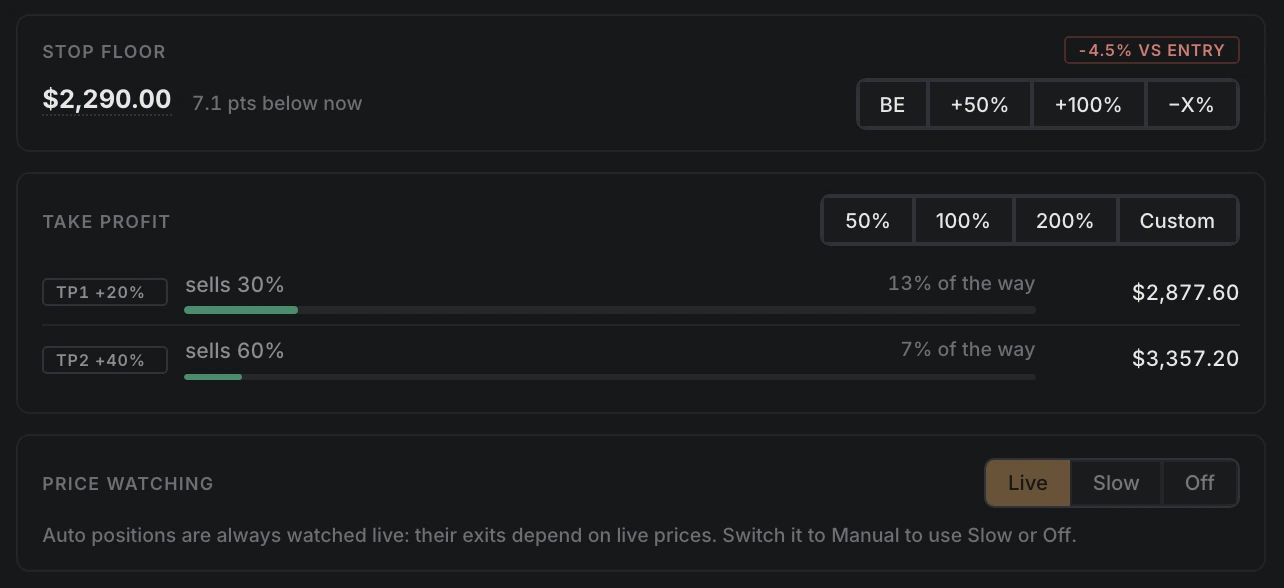
Stop-loss, trailing stop and take-profit
Attach a stop or trailing stop to each buy, with optional take-profit steps. Uurly monitors your positions while the app is running.
- 1Stop or trailing stop — set with the buy, moved any time.
- 2Take-profit in steps — sell part at +20%, more at +40%.
- 3Stop floor — break-even, +50% or +100%.
In a fast drop a sale can fill below the stop. Coins held in the Uurly Wallet get price alerts instead.
Conditional orders (IF / THEN)
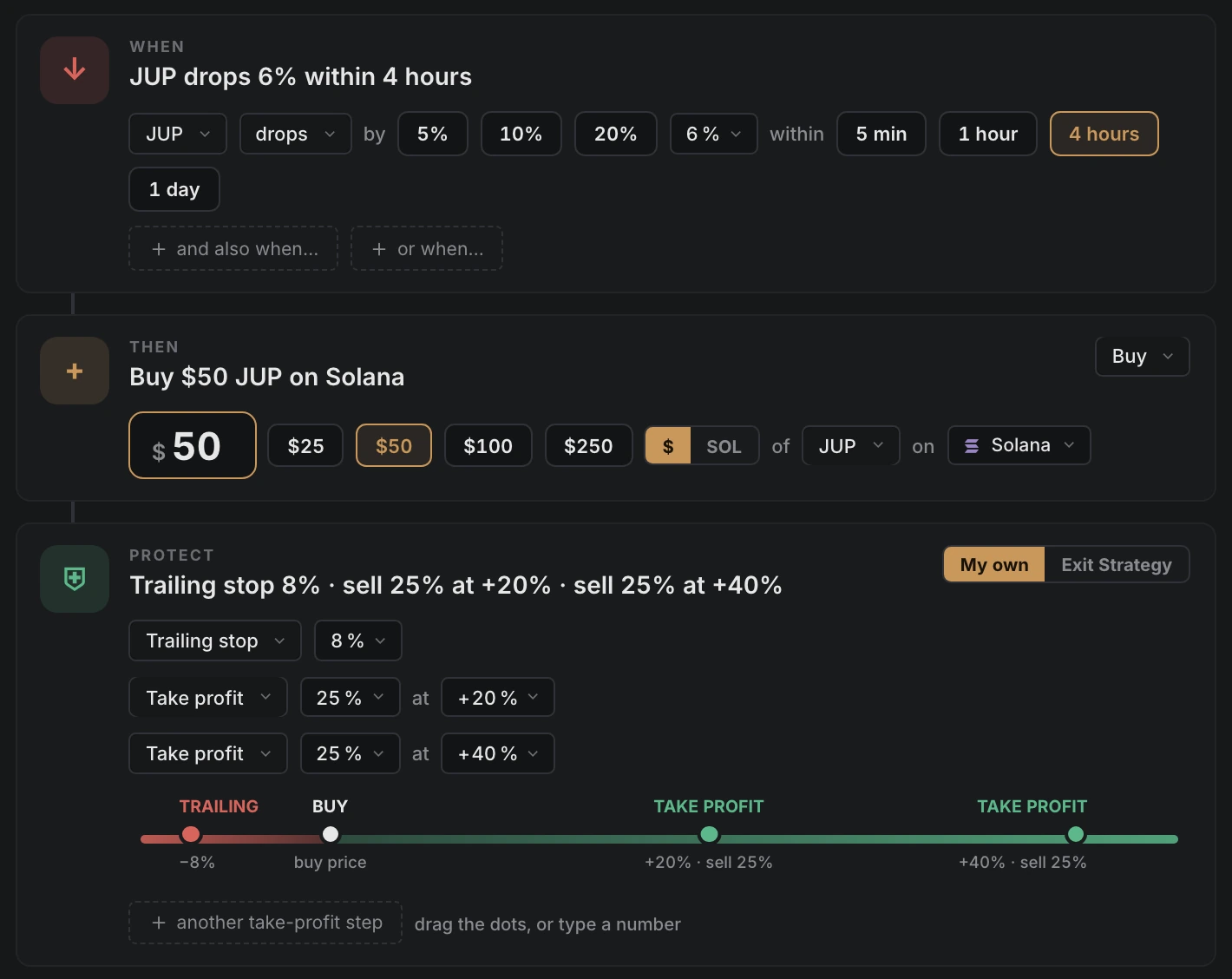
Define actions that run when a condition is met, for example: buy $50 of JUP after a 6% drop within 4 hours. Rules run while the app is open, within the limits you set.
- 1Test it on past prices — see how often it would have fired.
- 2Notify, Suggest or Auto — per recipe, with a daily cap.
- 3Protection built in — every buy gets its stop and take-profit.
A dry-run is hindsight, not a forecast. You write every recipe; Uurly doesn’t suggest or rank them.
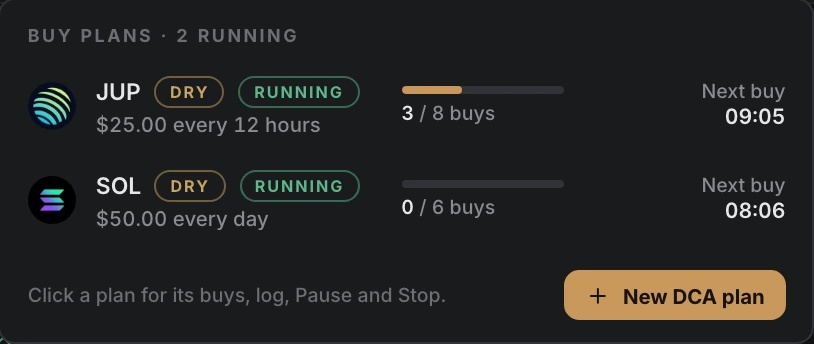
Dollar-cost averaging
Recurring buys on a time or price interval. Every buy adds to one position with its stop already in place.
- 1Every few hours or daily — or at price steps you choose.
- 2Stops when you say — after a number of buys or a total budget.
- 3Try it on paper first — real prices, no money.
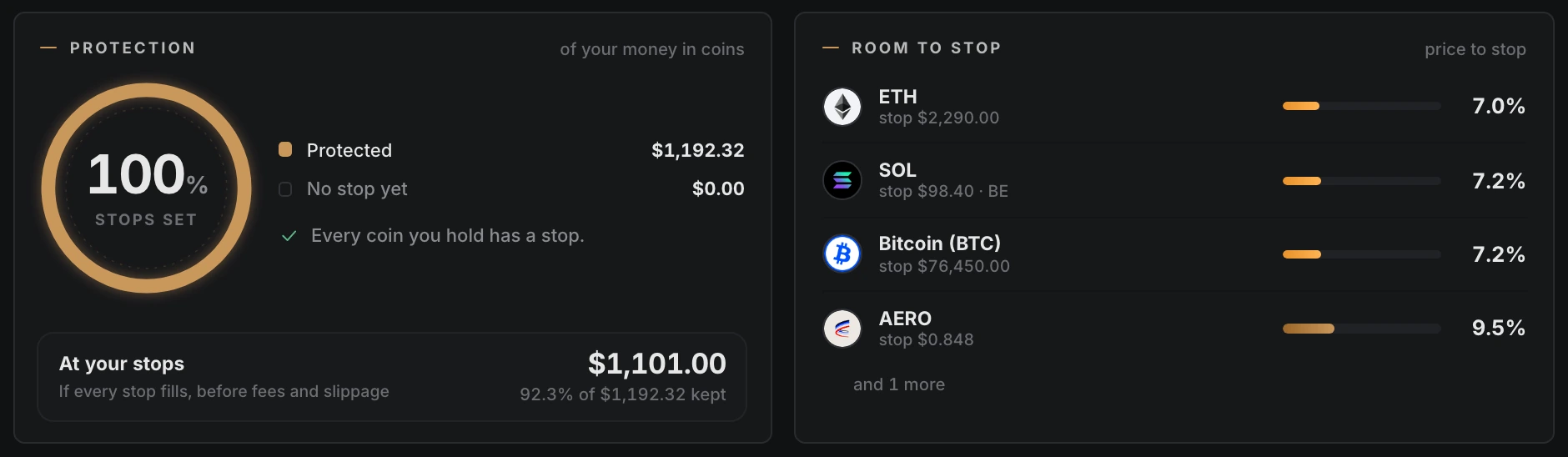
Portfolio overview across chains
Holdings on every chain, the distance from each coin to its stop, and today’s activity log. Orders can be typed in ⌘K and are confirmed from a preview.
- 1Protection — how much of your money has a stop.
- 2Room to stop — the distance from price to stop, per coin.
- 3⌘K — “move stop eth to break-even”, then confirm.
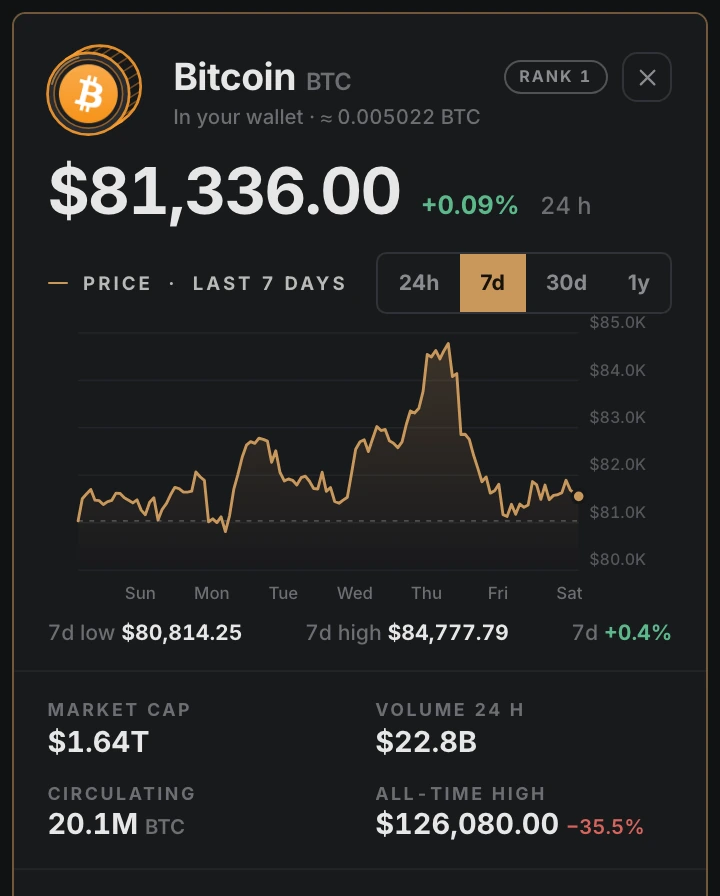
The top 100, and where you can trade them
See which top-100 coins trade on your chains, and buy or protect them from the same list.
- 1Original coins — on their own chain; BTC on the Bitcoin network.
- 2On my chains — shows only what you can trade.
- 3A panel per coin — price, chart, links and where to trade it.
Market information, the same for everyone. Not advice.
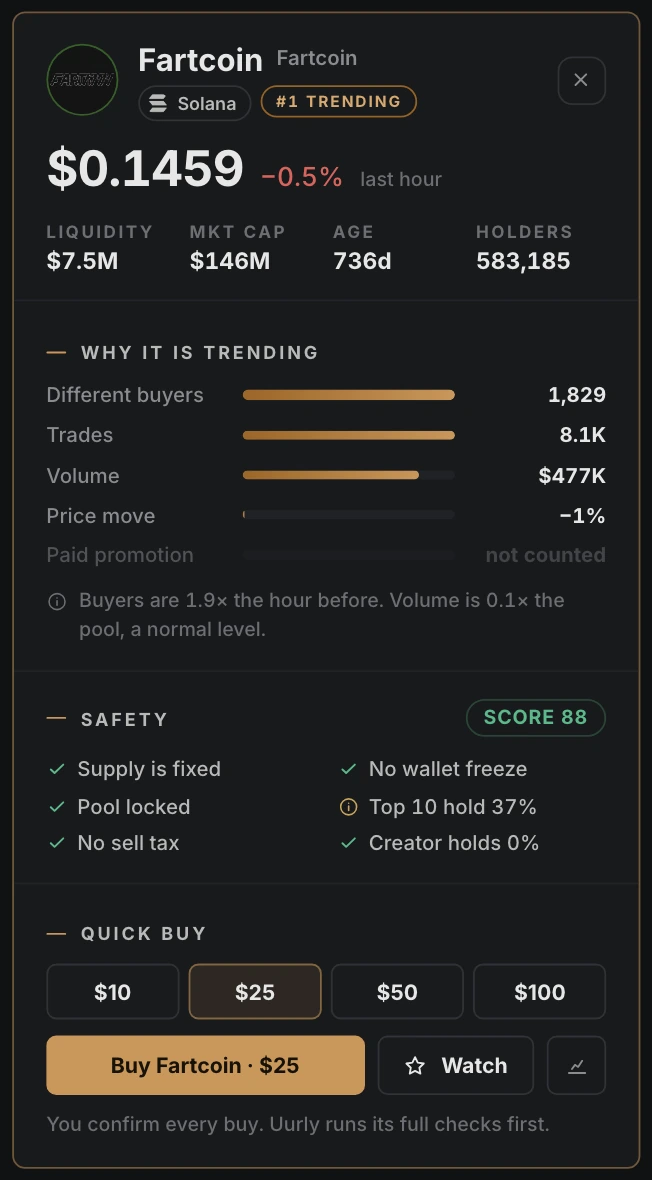
Trending by unique buyers and volume
Coins ranked by how many different wallets buy them, how often they trade and how much volume goes through, against the size of the pool. The same list for everyone.
- 1A reason per coin — like “buyers 4.1× the hour before”.
- 2A safety score on every row — Hide risky takes out the red ones.
- 3Paid promotion never ranks — a promoted coin is labelled and shown last.
Not a recommendation. Every buy goes through the buy window and Uurly’s checks.
Signal sources
Each source can send a notification, suggest a buy for you to confirm, or buy automatically within your rules.
- 1Uurly scanner — new coins on Solana, Base, Robinhood and Arc, checked first.
- 2Wallet tracker — follow wallets you enter yourself.
- 3Watchlist alerts — price and volume rules on coins you picked.
Signals are information, not advice. A passed check is not a safe coin; new coins can go to zero.
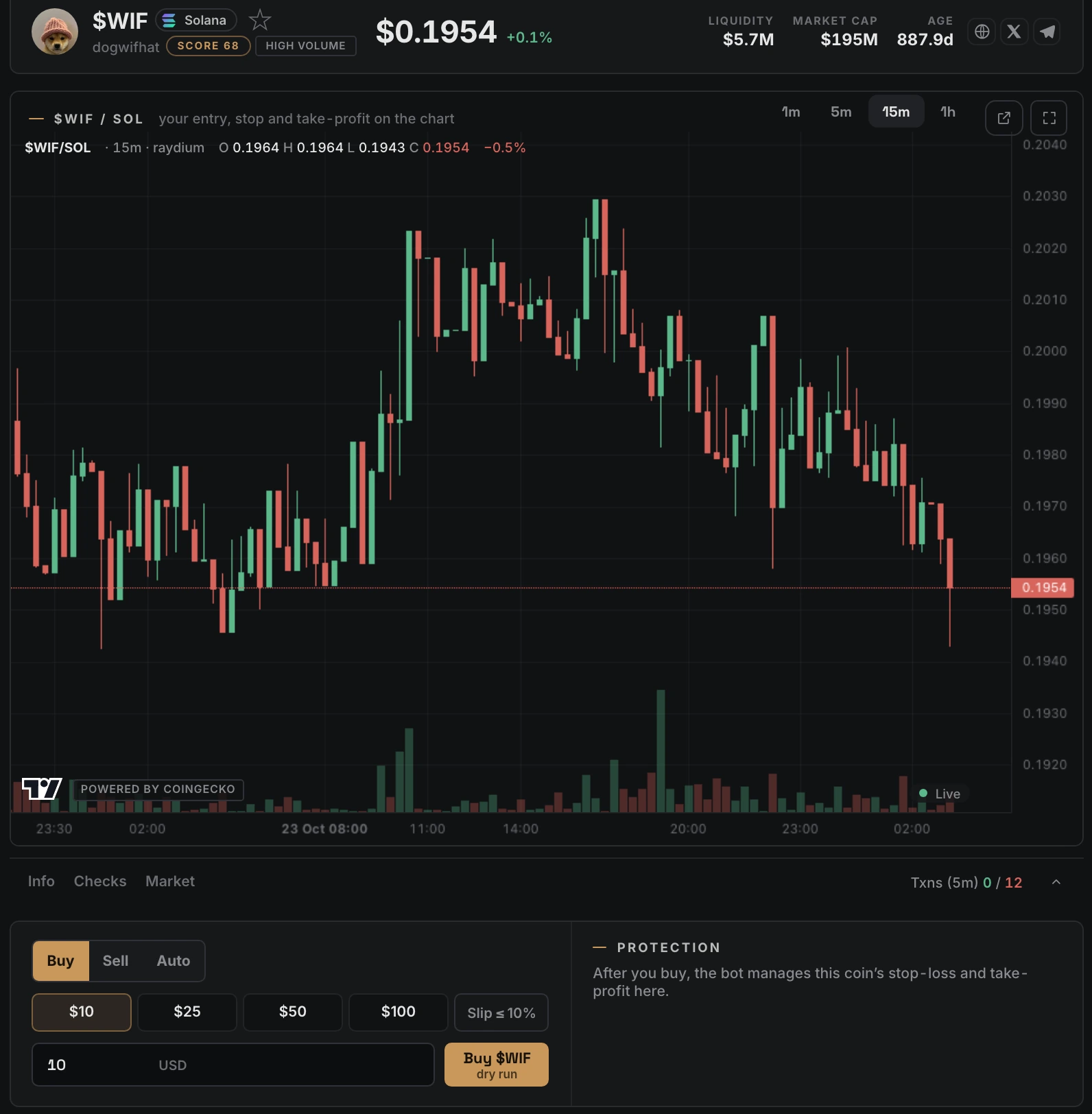
Watchlist, chart and order ticket
In Signals mode, Trade puts your watchlist, the chart and the buy ticket side by side.
- 1Live prices — most new pools update on every trade.
- 2Filters you can save — chains, Hide risky, Ready to buy now.
- 3Buy, Sell or Auto — from the ticket next to the chart.
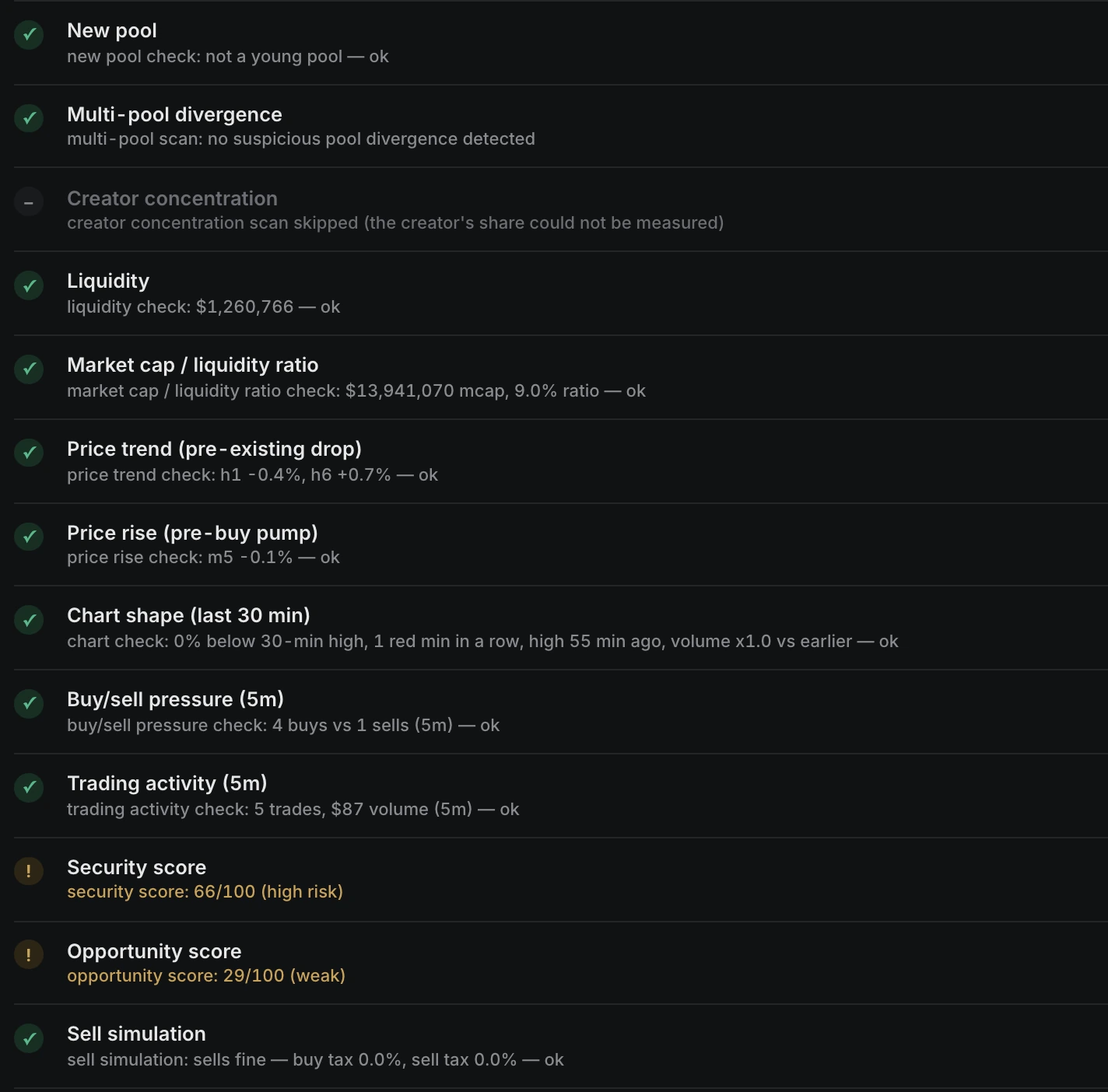
Pre-trade token checks
Before each buy, Uurly runs its token checks. If one fails, the buy is refused and the reason is shown.
- 1Sell test — on Robinhood Chain and Base, a buy and a sell simulated without spending money.
- 2Pool and trading checks — liquidity, pulled pools, buyers without sellers.
- 3Scores — security and opportunity, with your own minimum.
Checks lower the risk. They can’t catch every scam, and new coins can still go to zero.
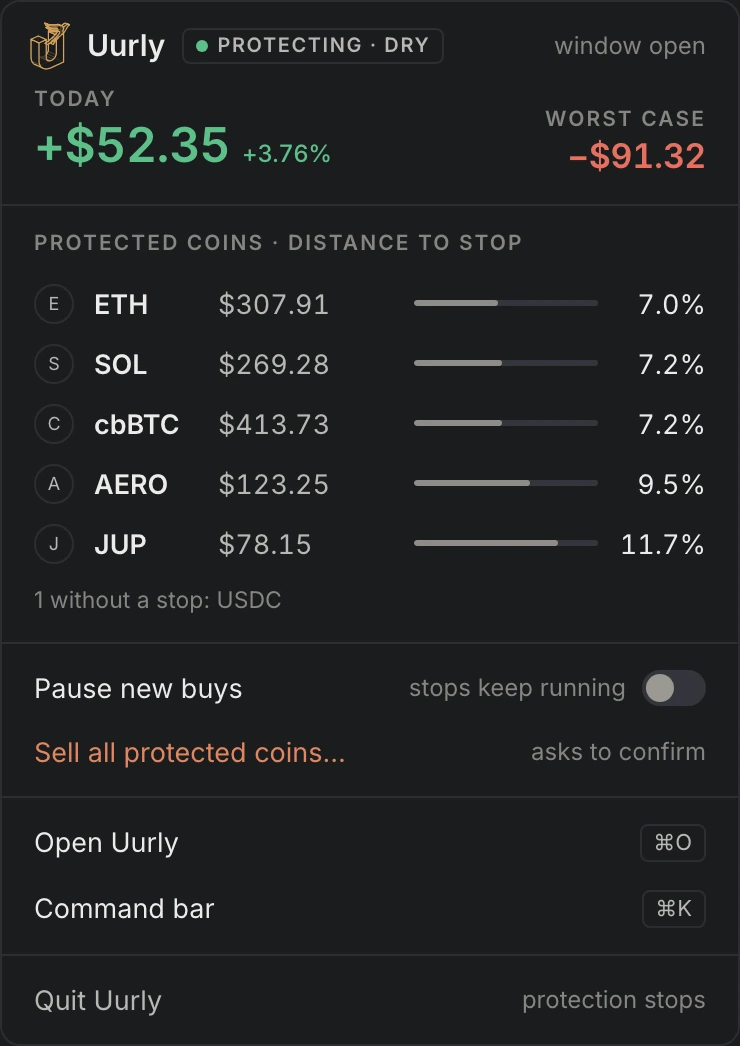
Protection from the menu bar
The menu bar shows today’s result and the distance to every stop, also with the window closed.
- 1Pause new buys — stops keep running.
- 2Sell all protected coins — after a confirm.
- 3Quit asks first — and lists what loses protection.
A closed laptop sleeps. Keep it awake on power for overnight stops.
AI with your API key Beta
A second opinion before you trade.
Ten AI helpers run on your API key from Claude, ChatGPT, Gemini, Grok or OpenRouter. The AI advises; your rules, stops and limits decide.
Safety
- 1Contract reader
- 2Spam token detector
- 5AI risk check
Trading
- 3AI exit timing
- 4AI entry timing
- 6“Why this coin?”
Help & learning
- 7Ask AI
- 8Trade review
- 9Settings in plain language
- 10Command bar in plain language
Works with an API key from



Your key stays on your computer · you pay the provider · nothing goes through our servers
BetaAI features are in beta and can make mistakes.
How it worksChains and coins
36 chains and 84 coins
Every coin trades on its home chain, from your wallet: BTC on the Bitcoin network, not a wrapped copy.
- 36chains
- 84coins · 68 top-100 + 16 stablecoins
 Bitcoin
 Ethereum
 Base
Base Robinhood Chain
 Solana
 Avalanche
 BNB Chain
 XRP Ledger
 Arc
Arc HyperEVM
 TRON
TRON Zcash
Zcash Dogecoin
 Cardano
 NEAR
NEAR Stellar
 Arbitrum
 Bitcoin Cash
 Litecoin
 Sui
Sui TON
TON Hedera
 Bittensor
 Cronos
 X Layer
 Polkadot
 MemeCore
 Internet Computer
 Algorand
 Polygon
 Cosmos Hub
 Injective
 Aptos
Aptos Stacks
 Stable
 XDC Network
- BTC
- ETH
- BNB
- XRP
 SOL
SOL- TRX
- ZEC
- HYPE
- DOGE
 WBT
WBT LINK
LINK- ADA
- NEAR
- XLM
 RAIN
RAIN- BCH
- +68 more
Pricing
Plans and fees
Free
Coming soonA $100 swap costs $0.85.
- Sending and receiving: no fee
- Paper trades and failed swaps: no fee
Pro
Founding priceOne flat price, paid in advance by the month. The first 50 keep it for as long as they stay on Pro; after that it is $15.99 / month.
- Pay from your Uurly Wallet, in the app
Pro is cheaper than the fee from about $940 of swaps a month.
Full pricing and what a swap costsIs there a free version?
Yes, coming soon. Free will have every feature, with a 0.85% Uurly fee per swap, shown before every swap. Pro removes the fee.
Does Uurly hold my coins or my keys?
No. Your coins are in your own wallet. The key is stored encrypted on your computer and signs there. Uurly's server holds no wallet and can't trade. The one exception is a swap through ChangeNOW for a coin without a DEX route, shown before you confirm.
Is Uurly a Web3 wallet?
Yes. Uurly is a non-custodial Web3 wallet for Mac, Windows and Linux. You hold, send, receive and swap coins on 36 chains, and the stops, take-profit and DCA plans work on the same coins. Your keys stay on your computer.
What happens when I close the app?
Uurly keeps running from the menu bar on a Mac (the tray on Windows), so your stops keep working. Quit asks first and lists the positions that lose protection.
And when my laptop is closed?
A sleeping computer can't sell. Protection picks up again when it wakes, so keep it awake and plugged in for overnight stops.
Does Uurly tell me what to buy?
No. Uurly runs the rules you set; market data and signals are the same information for everyone, not investment advice.
What do I need to run Uurly?
A Mac with macOS 13 Ventura or later (Apple silicon or Intel), or a 64-bit PC with Windows 10 or 11, or Linux (Ubuntu 22.04 or newer, Intel/AMD or ARM). About 500 MB free disk space, 8 GB RAM recommended and an internet connection. All system requirements
What runs on its own in the EEA?
Rules you set run as you set them: Recipes on Auto, DCA plans and every exit. Only a buy straight from a signal waits for your confirmation.
Uurly Free for Mac, Windows and Linux
Join the waitlist and we'll email you when it's out.
Built with
















Uurly is independent and not affiliated with, sponsored or endorsed by the companies shown.
Built for
 Linux
Linux